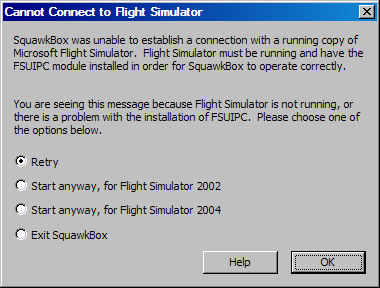
Flight Simulator is not Running
When SquawkBox starts it attempts to connect to a running copy of Flight Simulator. It does this so it knows what version of the multiplayer system to initialize: Flight Simulator 2002 or Flight Simulator 2004. If Flight Simulator is not running when you start SquawkBox you will see this dialog.
If you wish to start Flight Simulator later, simply choose either of the Start anyway options depending on which version of Flight Simulator you are using. You can also select Retry to re-attempt the connection to Flight Simulator, or Exit SquawkBox to give up and shut down SquawkBox.
If you see this error even when Flight Simulator is indeed running, you should confirm that a working version of the FSUIPC module is installed in the Flight Simulator modules directory. This module is installed automatically for you when you install SquawkBox, so re-running the SquawkBox installer may be the correct course of action in this case.
For more information on getting started with SquawkBox, read the Quick Start Guide.